Saturday, 4 November 2023

Containerlab and Juniper VSRX3.0


Juniper Virtual SRX on Containerlab


https://containerlab.dev/manual/kinds/vr-vsrx/

Setup is Juniper vSRX3 with Containerlab and two linux hosts. 


root@E5450:/home/sonicepk/clab-vsrx# clab version


                           _                   _       _     

                 _        (_)                 | |     | |    

 ____ ___  ____ | |_  ____ _ ____   ____  ____| | ____| | _  

/ ___) _ \|  _ \|  _)/ _  | |  _ \ / _  )/ ___) |/ _  | || \ 

( (__| |_|| | | | |_( ( | | | | | ( (/ /| |   | ( ( | | |_) )

\____)___/|_| |_|\___)_||_|_|_| |_|\____)_|   |_|\_||_|____/ 


    version: 0.47.2

     commit: 0b3991f0

       date: 2023-10-26T10:18:52Z

     source: https://github.com/srl-labs/containerlab

 rel. notes: https://containerlab.dev/rn/0.47/#0472

root@E5450:/home/sonicepk/clab-vsrx# 


root@E5450:/home/sonicepk/clab-vsrx# docker -v

Docker version 24.0.6, build ed223bc

root@E5450:/home/sonicepk/clab-vsrx# 


root@E5450:/home/sonicepk/vrnetlab# git branch

* (HEAD detached at v0.12.0)

  master

root@E5450:/home/sonicepk/vrnetlab# 


root@E5450:/home/sonicepk/vrnetlab/vsrx# ls

docker  junos-vsrx3-x86-64-23.2R1.13.qcow2  Makefile

root@E5450:/home/sonicepk/vrnetlab/vsrx# 


root@E5450:/home/sonicepk/vrnetlab/vsrx# docker image ls | grep srx

vrnetlab/vr-vsrx                                                     23.2R1.13           dd25f7b62ffc   2 days ago      1.67GB

root@E5450:/home/sonicepk/vrnetlab/vsrx# 


root@E5450:/home/sonicepk/clab-vsrx# cat vsrx-linux.yml 

name: vsrx1

topology:

  nodes:

    srx1:

      kind: vr-vsrx

      image: vrnetlab/vr-vsrx:23.2R1.13

      startup-config: srx1.txt 

    client1:

      kind: "linux"

      image: wbitt/network-multitool:alpine-extra

      exec:

        - ip addr add 192.168.1.2/30 dev eth1

        - ip route add 192.168.2.0/30 via 192.168.1.1

    client2:

      kind: "linux"

      image: wbitt/network-multitool:alpine-extra

      exec:

        - ip addr add 192.168.2.2/30 dev eth1

        - ip route add 192.168.1.0/30 via 192.168.2.1

  links:

    - endpoints: ["srx1:eth1", "client1:eth1"]

    - endpoints: ["srx1:eth2", "client2:eth1"]

root@E5450:/home/sonicepk/clab-vsrx# 


In my tests, the startup-config directive never worked. Containerlab did copy the contents of srx1.txt to the startup-configcfg but they never got loaded when the lab wsa started. I always had to log into the vsrx and add the commands via the Junos CLI.

root@E5450:/home/sonicepk/clab-vsrx/clab-vsrx1/srx1/config# cat startup-config.cfg 


root@E5450:/home/sonicepk/clab-vsrx# cat srx1.txt 

set interfaces ge-0/0/0 unit 0 family inet address 192.168.1.1/30

set interfaces ge-0/0/1 unit 0 family inet address 192.168.2.1/30

set security zones security-zone trust interfaces ge-0/0/0 host-inbound-traffic system-services all

set security zones security-zone trust interfaces ge-0/0/1 host-inbound-traffic system-services all

set system services web-management https system-generated-certificate

set security forwarding-options family mpls mode packet-based


root@E5450:/home/sonicepk/clab-vsrx# 


root@E5450:/home/sonicepk/clab-vsrx# clab inspect --all

+---+-----------------+----------+--------------------+--------------+--------------------------------------+---------+---------+----------------+----------------------+

| # |    Topo Path    | Lab Name |        Name        | Container ID |                Image                 |  Kind   |  State  |  IPv4 Address  |     IPv6 Address     |

+---+-----------------+----------+--------------------+--------------+--------------------------------------+---------+---------+----------------+----------------------+

| 1 | vsrx-alpine.yml | vsrx1    | clab-vsrx1-client1 | f06a4997ac1b | wbitt/network-multitool:alpine-extra | linux   | running | 172.20.20.4/24 | 2001:172:20:20::4/64 |

| 2 |                 |          | clab-vsrx1-client2 | c77b68244805 | wbitt/network-multitool:alpine-extra | linux   | running | 172.20.20.3/24 | 2001:172:20:20::3/64 |

| 3 |                 |          | clab-vsrx1-srx1    | 85e3251a27c1 | vrnetlab/vr-vsrx:23.2R1.13           | vr-vsrx | running | 172.20.20.2/24 | 2001:172:20:20::2/64 |

+---+-----------------+----------+--------------------+--------------+--------------------------------------+---------+---------+----------------+----------------------+

root@E5450:/home/sonicepk/clab-vsrx# 


Takes approx 5 minutes to boot the vsrx on my old laptop. Intel i5/8G of ram. My laptop does not have enough grunt to run two instances, but one works fine. 

root@E5450:/home/sonicepk/clab-vsrx# docker container ls

CONTAINER ID   IMAGE                                  COMMAND                  CREATED          STATUS                    PORTS                                        NAMES

85e3251a27c1   vrnetlab/vr-vsrx:23.2R1.13             "/launch.py --userna…"   10 minutes ago   Up 10 minutes (healthy)   22/tcp, 830/tcp, 5000/tcp, 10000-10099/tcp   clab-vsrx1-srx1

f06a4997ac1b   wbitt/network-multitool:alpine-extra   "/bin/sh /docker-ent…"   10 minutes ago   Up 10 minutes             80/tcp, 443/tcp, 1180/tcp, 11443/tcp         clab-vsrx1-client1

c77b68244805   wbitt/network-multitool:alpine-extra   "/bin/sh /docker-ent…"   10 minutes ago   Up 10 minutes             80/tcp, 443/tcp, 1180/tcp, 11443/tcp         clab-vsrx1-client2

root@E5450:/home/sonicepk/clab-vsrx#


admin> show configuration | display set 

set version 23.2R1.13

set system root-authentication encrypted-password "$6$B5eNOTgy$Ty5MUZ7GaiTlN33doSrH4dP/mPNiyprXnnglpHeL9.HYcIL5bqtcPzIPVIKAEl0ExcyoMEOvsvH5/a3NH1Nnt1"

set system login user admin uid 2000

set system login user admin class super-user

set system login user admin authentication encrypted-password "$6$TUXLlZlu$.E9gHo.sljNzZCRdgsc1aAW5vkJb2VliIoZBbvqhHTuRXqfkp8PwhjLHT6Sfhm7lm6sht7Zl5zjD7nK3dJ.SJ0"

set system services ssh

set system services netconf ssh

set system services web-management https system-generated-certificate

set system management-instance

set security forwarding-options family mpls mode packet-based

set security zones security-zone trust interfaces ge-0/0/0.0 host-inbound-traffic system-services all

set security zones security-zone trust interfaces ge-0/0/1.0 host-inbound-traffic system-services all

set interfaces ge-0/0/0 unit 0 family inet address 192.168.1.1/30

set interfaces ge-0/0/1 unit 0 family inet address 192.168.2.1/30

set interfaces fxp0 unit 0 family inet address 10.0.0.15/24

set routing-instances mgmt_junos routing-options static route 0.0.0.0/0 next-hop 10.0.0.2

set routing-instances mgmt_junos description management-instance


admin> 


Traceroute from client1---eth1------ge-0/0/0---VSRX---ge-0/0/1----eth1---client2


root@E5450:/home/sonicepk/clab-vsrx# docker exec -it clab-vsrx1-client1 ash

/ # ip a show dev eth1

131: eth1@if132: <BROADCAST,MULTICAST,UP,LOWER_UP> mtu 9500 qdisc noqueue state UP group default 

    link/ether aa:c1:ab:ac:1b:19 brd ff:ff:ff:ff:ff:ff link-netnsid 1

    inet 192.168.1.2/30 scope global eth1

       valid_lft forever preferred_lft forever

    inet6 fe80::a8c1:abff:feac:1b19/64 scope link 

       valid_lft forever preferred_lft forever

/ # ip route

default via 172.20.20.1 dev eth0 

172.20.20.0/24 dev eth0 proto kernel scope link src 172.20.20.4 

192.168.1.0/30 dev eth1 proto kernel scope link src 192.168.1.2 

192.168.2.0/30 via 192.168.1.1 dev eth1 

/ # traceroute 192.168.2.2

traceroute to 192.168.2.2 (192.168.2.2), 30 hops max, 46 byte packets

 1  192.168.1.1 (192.168.1.1)  0.397 ms  0.347 ms  0.290 ms

 2  192.168.2.2 (192.168.2.2)  0.263 ms  0.374 ms  0.762 ms

/ # 


Saturday, 7 August 2021

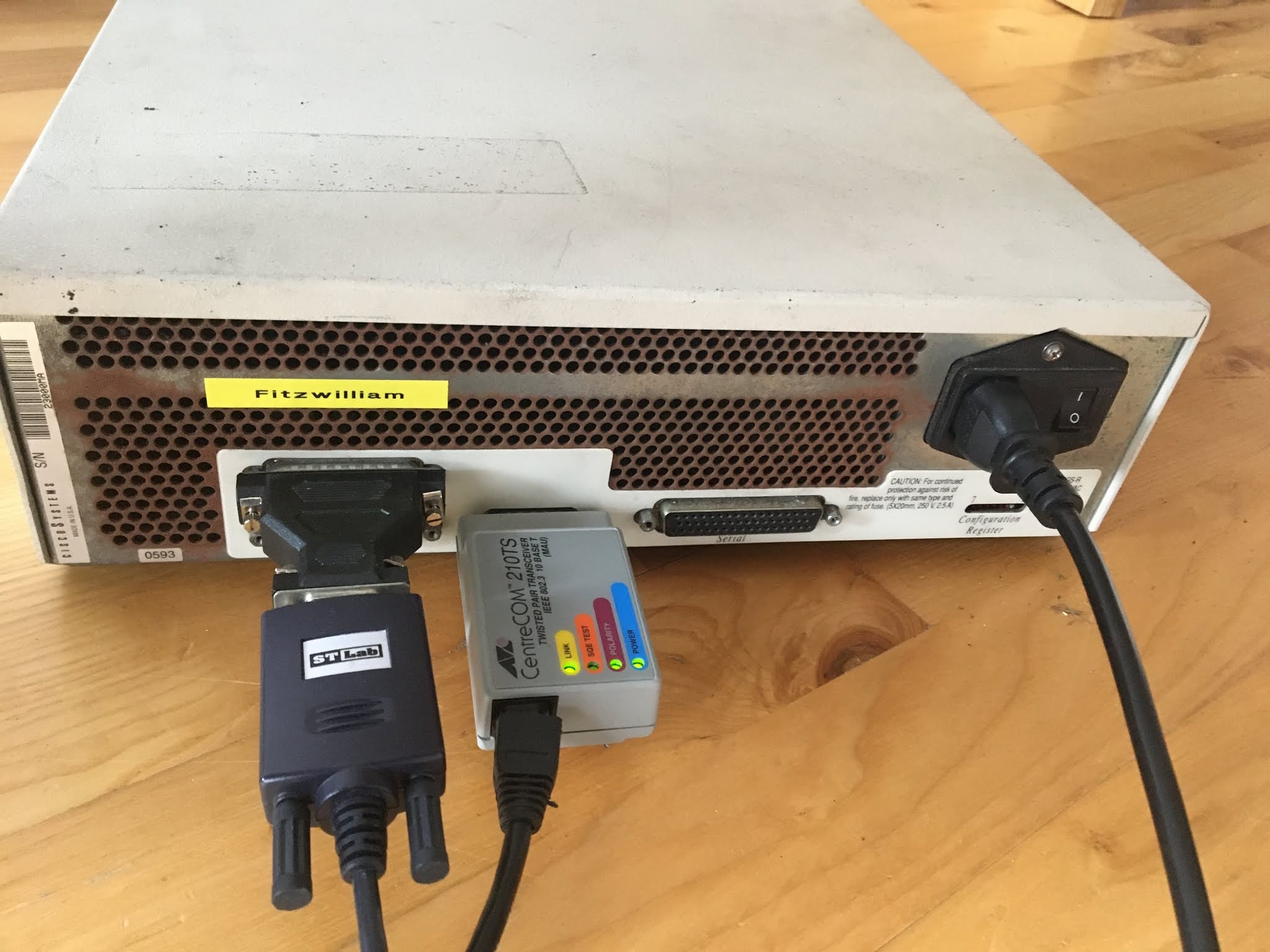
Cisco IGS-R from 1993 pings Google for the first time in 2021

Thought I might try and see what would happen if I powered on a Cisco IGS from 1993. 


Useful manual for the IGS can be found here:

https://docstore.mik.ua/univercd/cc/td/doc/product/access/acs_fix/cisigslr/igslrhir/index.htm


Initially it was was stuck in a loop at the bootloader. After opening up and pushing home the EPROMs, I got a bit further. 

"Bad checksum for configuration memory"

After another quick clean and playing with the RAM, it successfully booted. 


System Bootstrap, Version 4.6(4), SOFTWARE
Copyright (c) 1986-1993 by cisco Systems
IGS processor with 1024 Kbytes of memory

              Restricted Rights Legend

Use, duplication, or disclosure by the Government is
subject to restrictions as set forth in subparagraph
(c) of the Commercial Computer Software - Restricted
Rights clause at FAR sec. 52.227-19 and subparagraph
(c) (1) (ii) of the Rights in Technical Data and Computer
Software clause at DFARS sec. 252.227-7013.

              cisco Systems, Inc.
              1525 O'Brien Drive
              Menlo Park, California 94025


3000 Software (IGS-KR), Version 9.1(4) [fc1], SOFTWARE
Copyright (c) 1986-1993 by cisco Systems, Inc.
Compiled Thu 25-Mar-93 12:57 by daveu


cisco IGS (68020) processor (revision I) with 1024K/512K bytes of memory.
Processor board serial number 00740975
DDN X.25 software, Version 2.0.
Bridging software.
1 Ethernet/IEEE 802.3 interface.
1 Serial network interface.
16K bytes of non-volatile configuration memory.
Bad checksum for configuration memory


 You got to love the range of protocols available to configure...

Configuring global parameters:

  Enter host name [Router]: fitzwilliam
  Enter enable password: fitz2021
  Enter virtual terminal password: fitz2021
  Configure SNMP Network Management? [yes]: no
  Configure IP? [yes]:
    Configure IGRP routing? [yes]: no
    Configure RIP routing? [no]:
  Configure DECnet? [no]:
  Configure XNS? [no]:
  Configure Novell? [no]:
  Configure Apollo? [no]:
  Configure AppleTalk? [no]:
  Configure CLNS? [no]:
  Configure Vines? [no]:
  Configure bridging? [no]:

 fitzwilliam>show ver
3000 Software (IGS-KR), Version 9.1(4) [fc1], SOFTWARE
Copyright (c) 1986-1993 by cisco Systems, Inc.
Compiled Thu 25-Mar-93 12:57 by daveu

System Bootstrap, Version 4.6(4), SOFTWARE

fitzwilliam uptime is 3 minutes
System restarted by power-on
Running default software


cisco IGS (68020) processor (revision I) with 1024K/512K bytes of memory.
Processor board serial number 00740975
DDN X.25 software, Version 2.0.
Bridging software.
1 Ethernet/IEEE 802.3 interface.
1 Serial network interface.
16K bytes of non-volatile configuration memory.
Configuration register is 0x2101
fitzwilliam>


Next step was try and see if I could connect a 10 Base T CentreCOM transceiver. Fortunately an old TP-LInk switch I have has 10/100 ports.


Success from my laptop

ekenny@E5450:~$ ping 192.168.0.101
PING 192.168.0.101 (192.168.0.101) 56(84) bytes of data.
64 bytes from 192.168.0.101: icmp_seq=2 ttl=255 time=8.61 ms
64 bytes from 192.168.0.101: icmp_seq=3 ttl=255 time=8.26 ms
64 bytes from 192.168.0.101: icmp_seq=4 ttl=255 time=6.68 ms
64 bytes from 192.168.0.101: icmp_seq=5 ttl=255 time=19.0 ms
64 bytes from 192.168.0.101: icmp_seq=6 ttl=255 time=6.73 ms


Success ping from Cisco IGS to www.hea.net

fitzwilliam#ping www.hea.net
Translating "WWW.HEA.NET"...domain server (1.1.1.1) [OK]
Type escape sequence to abort.
Sending 5, 100-byte ICMP Echos to 193.1.219.11, timeout is 2 seconds:
!!!!!
Success rate is 100 percent (5/5), round-trip min/avg/max = 12/14/20 ms
fitzwilliam#

Pinging Google for the first time!

fitzwilliam#ping www.google.com
Translating "WWW.GOOGLE.COM"...domain server (1.1.1.1) [OK]
Type escape sequence to abort.
Sending 5, 100-byte ICMP Echos to 74.125.193.147, timeout is 2 seconds:
!!!!!
Success rate is 100 percent (5/5), round-trip min/avg/max = 16/17/20 ms
fitzwilliam#


fitzwilliam#show config

Using 516 out of 16378 bytes
version 9.1
!
hostname fitzwilliam
!
enable-password fitz2021
service config
!
!
!
!
!
!
!
!
!
interface Ethernet 0
ip address 192.168.0.101 255.255.255.0
no mop enabled
!
interface Serial 0
 --More--  
ip address 192.168.1.101 255.255.255.0
!
!
ip route 0.0.0.0 0.0.0.0 192.168.0.1
!
!
!
!
!
ip name-server 1.1.1.1
!
!
line vty 0 4
login
line con 0
exec-timeout 0 0
line aux 0
line vty 0
password fitz2021
line vty 1
password fitz2021
line vty 2
 --More--  
password fitz2021
line vty 3
password fitz2021
line vty 4
password fitz2021
!
end


Saturday, 14 November 2020

First Experience of FreerTr aka freeRouter aka RARE

FreerTr also know as freeRouter is an open source router written in Java by Csaba Mate. The GEANT Router for Academic Research & Education (RARE) project uses freeRouter as their router operating system. 

http://www.freertr.net/

https://github.com/mc36/freeRouter

https://wiki.geant.org/display/RARE/Home

Some initial observations about freeRouter.

1) freeRouter is not like a traditional software router, where the data plane and control plane are bundled together. freeRouter allows you to use different data planes such as P4, pcap, DPDK and more using Unix sockets to map from the the physical interface to the forwarding plane of choice. Some examples I found in the rtr directory are p4dpdk.bin, p4pkt.bin, pcapInt.bin, p4emu.bin, pcap2pcap.bin and rawInt.bin. This makes freeRouter very useful for testing new forwarding planes.

2) The default install location is /rtr

3) The router configuration is stored in /rtr/rtr-sw.txt

4) While Open Vswitch is installed, it does not look like it is used. 

root@freertr:/rtr# ovs-vsctl show
6eab5861-c524-4f44-ba3e-565141f07824
    ovs_version: "2.13.1"
root@freertr:/rtr# 

root@freertr:/rtr# ovs-vsctl list bridge
root@freertr:/rtr# ovs-vsctl list port

5) There is no default table, you must use a VRF, but you can have multiple VRFs

6) freeRouter supports lots of routing protocols and new shiny things like Telemetry. 


How to get started. 

There are many ways to install freeRouter. There is an excellent blog post here:

https://wiki.geant.org/pages/viewpage.action?pageId=148083914

That explains how to install freeRouter on Debian from source. I have chosen to use a one line install from the freeRouter website on a Ubuntu 20.04 LTS Virtual Machine with 3 Ethernet interfaces. 

Step 1: Install Ubuntu 20.02 LTS

ekenny@freertr:~$ lsb_release -a
No LSB modules are available.
Distributor ID:    Ubuntu
Description:    Ubuntu 20.04.1 LTS
Release:    20.04
Codename:    focal
ekenny@freertr:~$

Step 2: Log into the Ubuntu machine a run the following:

wget http://www.freertr.net/install.sh && sudo bash install.sh

Running this command will blow away your current network setting and map the existing Ethernet Interfaces to Unix UDP sockets. 

ekenny@freertr:~$ ps -ef | grep 127
root         978     901  0 15:40 ?        00:00:01 /rtr/rawInt.bin ens160 20002 127.0.0.1 20001 127.0.0.1
root         993     901  0 15:40 ?        00:00:05 /rtr/rawInt.bin ens192 20012 127.0.0.1 20011 127.0.0.1
root         994     901  0 15:40 ?        00:00:00 /rtr/rawInt.bin ens224 20022 127.0.0.1 20021 127.0.0.1
root        1004     901  0 15:40 ?        00:00:00 /rtr/tapInt.bin tap20001 20042 127.0.0.1 20041 127.0.0.1 10.255.255.1/24 10.255.255.254

It will also create one new tunnel interface "tap20001" which is used to log into the freeRouter console from the host Ubuntu operating system. 

The IP addresses that were originally on the Ubuntu physical ens interfaces will now be associated with a Unix Socket and hence while still reachable for connecting to the host Ubuntu VM they will not appear on the physical interfaces where you would normally expect to see them!

The only IP address that you will see from the Unix shell is the IP address used for the tunnel interface to the freeRouter process for management. 10.255.255.1/24

ekenny@freertr:~$ ip address
1: lo: <LOOPBACK,UP,LOWER_UP> mtu 65535 qdisc noqueue state UNKNOWN group default qlen 1000
    link/loopback 00:00:00:00:00:00 brd 00:00:00:00:00:00
    inet 127.0.0.1/8 scope host lo
       valid_lft forever preferred_lft forever
    inet6 ::1/128 scope host
       valid_lft forever preferred_lft forever
2: ens160: <BROADCAST,MULTICAST,PROMISC,UP,LOWER_UP> mtu 1500 qdisc fq_codel state UP group default qlen 1000
    link/ether 00:0c:29:73:0d:6c brd ff:ff:ff:ff:ff:ff
3: ens192: <BROADCAST,MULTICAST,PROMISC,UP,LOWER_UP> mtu 1500 qdisc fq_codel state UP group default qlen 1000
    link/ether 00:0c:29:73:0d:76 brd ff:ff:ff:ff:ff:ff
4: ens224: <BROADCAST,MULTICAST,PROMISC,UP,LOWER_UP> mtu 1500 qdisc fq_codel state UP group default qlen 1000
    link/ether 00:0c:29:73:0d:80 brd ff:ff:ff:ff:ff:ff
5: tap20001: <BROADCAST,MULTICAST,UP,LOWER_UP> mtu 1500 qdisc fq_codel state UNKNOWN group default qlen 1000
    link/ether 00:00:4e:4a:4e:49 brd ff:ff:ff:ff:ff:ff
    inet 10.255.255.1/24 scope global tap20001
       valid_lft forever preferred_lft forever
    inet6 2001:db8:ffff:ffff:200:4eff:fe4a:4e49/64 scope global dynamic mngtmpaddr
       valid_lft 2591909sec preferred_lft 604709sec
    inet6 fe80::200:4eff:fe4a:4e49/64 scope link
       valid_lft forever preferred_lft forever

After a reboot you can still ssh to the Ubuntu host and then from the Ubuntu host you can telnet to the freeRouter management IP address 10.255.255.254

ekenny@freertr:~$ telnet 10.255.255.254
Trying 10.255.255.254...
Connected to 10.255.255.254.
Escape character is '^]'.
welcome
line ready
rtr#         

There is no default username or password set.

The comand line experience is very similar to your traditional router CLI. 

rtr#show interfaces full | include ip4

ip4 address=192.168.5.55/24, netmask=255.255.255.0, ifcid=10011
ip4 address=192.168.249.194/26, netmask=255.255.255.192, ifcid=10012
ip4 address=10.255.255.254/24, netmask=255.255.255.0, ifcid=10013
ip4 address=192.168.1.100/24, netmask=255.255.255.0, ifcid=10014
rtr#                                                            

 The 192 addresses are the addresses that were originally on the physical ens unterfaces before the installation. While the 10.255.255.254 is the management interface.

 Useful commands

- show running

rtr#show running-config                                                        
hostname rtr

rtr#show version                                                               
freeRouter v20.11.10-rel, done by cs@nop.

- config terminal

rtr#configure terminal                                                         
rtr(cfg)#                                                                      

- show config-changes

rtr(cfg)#banner set My Test freeRouter banner                                  
rtr(cfg)#show config-differences                                               
banner encoded TXkgVGVzdCBmcmVlUm91dGVyIGJhbm5lcg0K

- write

rtr#write                                                                      
% saving configuration
% success
rtr#exit

rtr#show startup-config isis                                                   
router isis4 1
 vrf inet
 net-id 49.0001.0192.0168.0005.0055.00
 traffeng-id ::
 is-type level1
 exit

rtr#show running-config interface eth1                                        
interface ethernet1
 description uplink
 vrf forwarding inet
 ipv4 address 192.168.5.55 255.255.255.0
 ipv6 address dynamic dynamic
 ipv6 gateway-prefix all6
 ipv6 slaac
 ipv6 prefix-suppress
 no shutdown
 no log-link-change
 exit
!


Changing the forwarding plane/data plane...

We now have a software router up and working. It is possible though to use hardware forwarding or DPDK or emulated P4. Probably a whole lot more as well. On the freeRouter website there is a clue. It says to activate external forwarding, 

activate external forwarding:
write
test hwext path /rtr/rtr- dataplane p4emu
reload cold

I suspect this is enabling P4 emulation rather than forwarding via the freeRouter process itself. That said I cannot find the "hwext" command in the install I have just done or the source.

Documentation

freeRouter documentation is sparse and the main places I have found are the GEANT RARE website https://wiki.geant.org/pages/viewrecentblogposts.action?key=RARE

and the unit tests for freeRouter are a good place to find configuration examples. http://www.freertr.net/tests.html

The interop tests, provide a good idea of what the equivalent freeRouter config looks like in comparison to Juniper (interop9) and Cisco IOS (Interop2).

Source code - http://sources.nop.hu/

https://github.com/mc36/freeRouter  


And Telemetry sensors at: http://sources.nop.hu/misc/sensor/

Grafana dashboard plugins for freeRouter. https://grafana.com/grafana/dashboards?search=rare


rtr#?                                                                          
  attach     - connect to system resources
  clear      - clear running conditions
  configure  - enter configuration mode
  debug      - start debugging one protocol
  delete     - remove configuration command
  differs    - running system difference information
  disable    - drop privileges
  display    - running system periodic information
  dtls       - start dtls session
  enable     - gain privileges
  exit       - close this exec session
  flash      - file system utility
  gpsemu     - start gps emulation session
  gpstime    - start gps session
  hostscan   - scan ports on remote
  listen     - start listen session
  logout     - close this exec session
  lookup     - domain name lookup
  menu       - start menu session
  modememu   - start modem emulation session
  netconf    - start netconf session
  nullemu    - start null session
  packet     - packet related things
  ping       - send echo request
  portscan   - scan ports on remote
  ppp        - start framed session
  reload     - restart the system
  set        - insert configuration command
  show       - running system information
  sleep      - do nothing for a while
  ssh        - start ssh session
  ssl        - start ssl session
  tclsh      - run tcl shell
  telnet     - start telnet session
  terminal   - terminal specific parameters
  test       - test various things
  tls        - start tls session
  traceroute - trace route to target
  undebug    - stop debugging one protocol
  view       - running system information
  watch      - running system periodic information
  whois      - perform whois query
  write      - save configuration
  xml        - start xml session
                   
rtr#

rtr(cfg)#?                                                                     
  aaa              - authentication configuration
  access-list      - build an access list
  alias            - configure a command alias
  banner           - banner of system
  bridge           - transparent bridging parameters
  buggy            - enable dangerous things
  bundle           - interface bundle parameters
  chat-script      - build a chat script
  client           - specify address of name server
  connect          - define one interface cross connection
  crypto           - cryptographic configuration
  dial-peer        - dial peer parameters
  do               - execute one exec command
  enable           - set enable password
  end              - close this config session
  event-manager    - build an event manager
  exit             - go back to previous mode
  hairpin          - interface hairpin parameters
  hostname         - set name of system
  interface        - select an interface to configure
  ipv4             - internet protocol config commands
  ipv6             - internet protocol config commands
  ipx              - ipx config commands
  line             - select a line to configure
  logging          - set logging parameters
  menu             - define one menu
  mtracker         - configure a mtracker
  no               - negate a command
  nsh              - specify service chaining
  object-group     - build an object group
  password-encrypt - set password encryption key
  policy-map       - build a policy map
  prefix-list      - build a prefix list
  process          - configure a external process
  proxy-profile    - proxy profile parameters
  route-map        - build a route map
  route-policy     - build a route policy
  router           - enable a routing protocol
  scheduler        - configure a scheduler
  script           - configure a script
  sensor           - sensor parameters
  server           - create new or update existing server process
  show             - running system information
  telemetry        - telemetry configuration
  time-map         - time map parameters
  tracker          - configure a tracker
  translation-rule - translation rule parameters
  vdc              - configure a virtual device context
  vpdn             - vpdn client parameters
  vrf              - configure a virtual routing forwarding
  xconnect         - define one protocol cross connection

rtr(cfg)#  

rtr(cfg)#show running-config                                                   
hostname rtr
buggy
banner encoded TXkgVGVzdCBmcmVlUm91dGVyIGJhbm5lcg0K
!
logging file debug zzz.log
logging rotate 65536000 zzz.old
!
crypto rsakey test_rsa import $v10$TUlJRW93SUJBQUtDQVFFQWxEaDlOeE91SSt4ZWZ2MTEyOVJPUXJZNmJnS1EyVDduWE41WDlGcG5VSGQ1ZHF6VHo5OFBObGdEaWw3VzZ4SklrTHJnanZSZmhHd2JNczJsa2FKR3FyK3VMd2ZVWCtBeTlBWHlCZVM0ajA4S0tvYjN2ZTZEUE8zOFVsdythKzJNNkdyOFEzZnp2SWZKN2xUWVdvNnhrMkFtV0pWOHZRK0IwcDhsMmtrVWcrK1dhSEFacFZySis3QUMrS2hBTmQ3VE9Nd2t1dnVUKzUzTHVUV2orZ1ppYWlxeUluL1ZoM3g1NW0zbUdRaXlwd1RwcFJRcWdTY2VCQzlMZnphcXZ4OXpnUUdOaDliZnQ5WXNwRWNuT2FFdlZkckJ5ZDR2eVJTZkFBaER2Q1V6alJiVWpxWC9HSmI1TjhhQXhzYnFUcDhBdW5KbXJtZ2dhR09zRHZQbTg4R3JCd0lEQVFBQkFvSUJBRWtUOE9pTzAzVHl2VVJ2UXdTM2tENWtDanJqR1BlRGhCN05vUi9nMHI5aHFJbFNmTHdvaGgrTkZYSExnTHMxc0lGcklmeFprQjZDRG9ibHpaUVlKaTlaZ2srOTFIL1EwazV0Ly8zWDN3Y0pPVUh1ZVljemFaRkk1UGJXZEJCU2R2N0FnTS9pL0ZFZndmZTM3VlA0dHFTcTZ6MFJ0d2FmOXFvWnZWZjZZQnNMNlk4L3J5VWREYi9vZUFUbGZnNWFmYlBPeWdQc1BPdEFQVW93bjdsLzd6dEMyeFVqZlBSKzVIcHRySFFCUzl3aVFadGFkL3pqYjk2aGJmQlZjLzVHZHppYkVFWEsxYVRXWlpueTR0Zm5hNjR0Wk84djVJUXh3cFZZUlF4dzI0ckdZSjk2L280MGhSeDNIS2h5dFFzc01qYTNyaytuZm9MdWVPTThldjB1c1VFQ2dZRUE3VVkwWDlxUDY3QmZIMi9mMHkzOVd2dkZmSkdFZ3NmMXBpc3JXWkhoaVN5a2JvRmcrbXZEVjJaUEZreUxtUm5XUW1WSHMxRCtBRCtTeGZnQWI3YklzSWZib3hVUUxmeHZRMHlvMGtibkhsM3BRUTVoRmFyYmFzc3BzdTM4U25NbDJ5UVA5Ym5NVVJFSjcvZE5INmF5elQwcG84c3lSNEtXL29xbE5PZXdNR01DZ1lFQW4rc1V3aThYeXB0Qk8ramp5SlpiOUhzS21wT2swb1ZnOXVMczNjRFJicHMvL0pRREE3eCtMb2hYelE5ZjRidDNUcGpCT0hIc2pIcmpTSG94RC9kMXRqMmxYcjloWWUvSmM0TW9kM2dneDdmSzBLOG5nY2RYSVVNcnp6TUVaeE4yRExPUzBkYVBMYUJGRk9idW4rUFBFT3hRaEhZbHN3b1Q4OHRBczc3SzBnMENnWUFpZ2JJK09tL3h5OTJabWRDSVNzanN3VzdRRmUyYWczQVRNWFlGZWJTK0dWTDBpelpLVlArOHB6RmJRZGlQZEhWM2hIa3Y5OWhvdXRZaW1sV2Q2WXc0T0JuV0Zzc2FsUHF0WSttdFl3aGJuemE3OGxabUswbnJ0dzRpYW4vbForZWFmaDBnRkZ4RmNkL3JHU0VMT0ZnS2h4bVdLNGZ0WkcySEtTeXJqQUpRbHdLQmdRQ2VYY3BINXlVVGNwNnVlcHFnK1M0Rk5aZ3hyZ2JxcUVWM0dSRGpKZUVCUE9PbitOZm5hbEkzT0xSaWtWZ3RqbDIvU3cwR0hlUFkxcFdnSDhuWWV3SnFRREExWFNkT09vMXdSREhkNWV2b2ZIMXdIaFRzczRENG9yR08xb0lFcGNRaEhmQkd0OGxBc05mWXREMFp3QnMrTWhnbXBXMytHUHZiVWF3NGxMZjhQUUtCZ0FvRmZwOURiVkQ5SmhxWU10T0lFVlVYa1VabnN5U1VlTjc0U3ZhUXBNU2JxQjJNN3JwRDhrZnBJVDIwdjhlRHBBa3hnSGFDb1d2M2JVQ3ZUL3A0aFA0NFlNZjhIOVRNaFo4cW5YSk83SytGbzZCeEZ6QWV3TnpzUU80QTBGaWNNa0N1dW5CNFRhaGNDVFgycENudXA2dkJMeGdDUUsxVUJGNEZSK3cxekhqUw==
!
crypto dsakey test_dsa import $v10$TUlJQnVRSUJBQUtCZ0NkeVN5OXZSQ1JrSEk0eXcxY241Z3pLTWtsVm9RVUx3cW5wZTBVRnZDZWdFc25Ma0dtdUdFclFwaFEySGJNZHNZTjVhOWFqcHFySWtLc29NRU16ZkpBclF3UlNkRWFOelBjUElpYmN2ZmxUQUlQWjYzQWs0OSt3b2t5cHBBZWlUWXp4OTgxRGMxWkdSdVRham1GbWw1OWpzZmJRaDhFSG1vTmFNcmlpUExsVEFoVUE0TC9CSHZlR0hKQ093ekF3RnlpcTZCVk5PakVDZ1lBTTVsamNiLzFCZi9XQzVoc3FVK25vS2poeDBnMGphVnNHdG9nR1dnUFpJSnl1UW5VR0lKS3JrMEkveEczc0UvbVE2Q0E2YmVjZWdIYUFYOW5Tc0QxWHJHNDUrVGJZd3N3RE54RUVkZ2lSUjY2dDRhWFdFRENMTy8xQVZLdFdwNU9PZDYzRkxyL0x0UFIwM3FybXFrSUYrejRjbVFoWTBUWUJCNHFPb0ZuVjFBS0JnQnp1RmRVRTJ6U1lON1dBRDFuUk5GS29aeGx4SzVvUGYydUhMamtMTUJEV3BGcUt0c3ZFVThTMDFCR0FiR3EwWlYrNkJGVm8wRGRiZmdHaU52cHk1aHdlVWovOWE2QUxzL0w3QTFyS3YxQXRVaW5nNTQxaE53THpIYk5zdE5HT3BsTXNldzQ5WkFDVDlRQ2VkSm9KNmhCaU9rMEw0UWhlV0wvY013Y05KekcwQWhRL2NCN09aaXZWRkFXREZoSUhPRHdmZUJUWG5RPT0=
!
crypto ecdsakey test_ecdsa import $v10$TUhNQ0FRRUVId2p4QjVxNFB2ejBubG9IeVpMY2RyK2VOcVc0RGh5RmZmeVdpbElhd2k2Z0J3WUZLNEVFQUFxaFJBTkNBQVRDTWpid3lMV2YxKzJXODROZEphT1paMTlVR0JFRmlDS3BnRVBCV3lMM3p6VmZxVFZWV2JudEpFQVB4dDYvdGcyWVZCanVXU3hsdVd0UnZFR0EvSE1u
!
crypto certificate test_cert_dsa import dsa test_dsa $v10$TUlJQ1R6Q0NBZytnQXdJQkFnSUVPclBJZWpBSkJnY3Foa2pPT0FRRE1BNHhEREFLQmdOVkJBTVRBM0owY2pBZUZ3MHlNREV4TVRBeU1UQTFNREJhRncwek1ERXhNRGd5TVRBMU1EQmFNQTR4RERBS0JnTlZCQU1UQTNKMGNqQ0NBYlV3Z2dFcUJnY3Foa2pPT0FRQk1JSUJIUUtCZ0NkeVN5OXZSQ1JrSEk0eXcxY241Z3pLTWtsVm9RVUx3cW5wZTBVRnZDZWdFc25Ma0dtdUdFclFwaFEySGJNZHNZTjVhOWFqcHFySWtLc29NRU16ZkpBclF3UlNkRWFOelBjUElpYmN2ZmxUQUlQWjYzQWs0OSt3b2t5cHBBZWlUWXp4OTgxRGMxWkdSdVRham1GbWw1OWpzZmJRaDhFSG1vTmFNcmlpUExsVEFoVUE0TC9CSHZlR0hKQ093ekF3RnlpcTZCVk5PakVDZ1lBTTVsamNiLzFCZi9XQzVoc3FVK25vS2poeDBnMGphVnNHdG9nR1dnUFpJSnl1UW5VR0lKS3JrMEkveEczc0UvbVE2Q0E2YmVjZWdIYUFYOW5Tc0QxWHJHNDUrVGJZd3N3RE54RUVkZ2lSUjY2dDRhWFdFRENMTy8xQVZLdFdwNU9PZDYzRkxyL0x0UFIwM3FybXFrSUYrejRjbVFoWTBUWUJCNHFPb0ZuVjFBT0JoQUFDZ1lBYzdoWFZCTnMwbURlMWdBOVowVFJTcUdjWmNTdWFEMzlyaHk0NUN6QVExcVJhaXJiTHhGUEV0TlFSZ0d4cXRHVmZ1Z1JWYU5BM1czNEJvamI2Y3VZY0hsSS8vV3VnQzdQeSt3TmF5cjlRTFZJcDRPZU5ZVGNDOHgyemJMVFJqcVpUTEhzT1BXUUFrL1VBbm5TYUNlb1FZanBOQytFSVhsaS8zRE1IRFNjeHREQUpCZ2NxaGtqT09BUURBeThBTUN3Q0ZDemhYcGliaXF1SjhTYVRZSFh2L05NbWdyR0VBaFErdHN2N3VNT1cvdVh3ZTRXNCtFcDlNZmlIY3c9PQ==
!
crypto certificate test_cert_ecdsa import ecdsa test_ecdsa $v10$TUlJQlJqQ0JycUFEQWdFQ0FnUmdNcWtFTUFrR0J5cUdTTTQ5QkFFd0RqRU1NQW9HQTFVRUF4TURjblJ5TUI0WERUSXdNVEV4TURJeE1EVXpOVm9YRFRNd01URXdPREl4TURVek5Wb3dEakVNTUFvR0ExVUVBeE1EY25SeU1GWXdFQVlIS29aSXpqMENBUVlGSzRFRUFBb0RRZ0FFd2pJMjhNaTFuOWZ0bHZPRFhTV2ptV2RmVkJnUkJZZ2lxWUJEd1ZzaTk4ODFYNmsxVlZtNTdTUkFEOGJldjdZTm1GUVk3bGtzWmJsclVieEJnUHh6SnpBSkJnY3Foa2pPUFFRQkE0R0hBRENCZ3dJZ1lWYWNvQnNxcW5vL20zaUNJNjB3QXByZWVwZ1BhdkduZUJxN1RQcmo0dWNDWHdDdEljNWxWTFVNRENWR3hyOXFXa3hTRUxFVVFSSWQ5SER6YVQyRDA4Qy91aWhVREwzUFdOTmdJNHYvUkZxSk9NOHVBZTJ5amd6TWUwRHljRHJUcFo3OGV2S0NIc2V2eWNrdWdSOWxwc20zSUlBcERBK2ZpV1dRRFFCc25GeGc=
!
crypto certificate test_cert_rsa import rsa test_rsa $v10$TUlJQ2t6Q0NBWDZnQXdJQkFnSUVOTXB2N3pBTEJna3Foa2lHOXcwQkFRVXdEakVNTUFvR0ExVUVBeE1EY25SeU1CNFhEVEl3TVRFeE1ESXhNRFEwTWxvWERUTXdNVEV3T0RJeE1EUTBNbG93RGpFTU1Bb0dBMVVFQXhNRGNuUnlNSUlCSWpBTkJna3Foa2lHOXcwQkFRRUZBQU9DQVE4QU1JSUJDZ0tDQVFFQWxEaDlOeE91SSt4ZWZ2MTEyOVJPUXJZNmJnS1EyVDduWE41WDlGcG5VSGQ1ZHF6VHo5OFBObGdEaWw3VzZ4SklrTHJnanZSZmhHd2JNczJsa2FKR3FyK3VMd2ZVWCtBeTlBWHlCZVM0ajA4S0tvYjN2ZTZEUE8zOFVsdythKzJNNkdyOFEzZnp2SWZKN2xUWVdvNnhrMkFtV0pWOHZRK0IwcDhsMmtrVWcrK1dhSEFacFZySis3QUMrS2hBTmQ3VE9Nd2t1dnVUKzUzTHVUV2orZ1ppYWlxeUluL1ZoM3g1NW0zbUdRaXlwd1RwcFJRcWdTY2VCQzlMZnphcXZ4OXpnUUdOaDliZnQ5WXNwRWNuT2FFdlZkckJ5ZDR2eVJTZkFBaER2Q1V6alJiVWpxWC9HSmI1TjhhQXhzYnFUcDhBdW5KbXJtZ2dhR09zRHZQbTg4R3JCd0lEQVFBQk1Bc0dDU3FHU0liM0RRRUJCUU9DQVFCTW1IL0pvQysvTjJZNkIvNnJMVTIwL3NmVjRJcSsrUVYzZHBxUGpuUlZ6ZGFNS1NwTkczekdzK051UVBESjVKSEpCU3pKSWQybnhZS253MDlQZEdyRmEwdUdubDB2VDlVNWhjYTdqYlpaT052OFNhdkI0UmpsdWF1aWlYTGh4UkhGSjNKWXBsMzk3Nkw4emRNSDROMzlWaG9LRTkrVlJjd0VJVUZiN3ByVVEyUTFiRG1oRFJ5aCs3Wit1K3JvQWVmdzdrSnBEZG1zTGVqRmdLRXFwelErNC9TUVZXSW5IbDAvSXg2SENVanVDT01tc0hYYTZmeG9EdkIyVlVIWW5DUnNYVDVQTGZHa2drTy9zV0ZSYUd3ZTlvd1hkL3JiYnZzNXd0UWIyYVMvWDJWM3Q3ZGR4YTFaaE00RnFqRjRiRStTbWFsYWcrZmRtVFdpRmNuSUVseXQ=
!
aaa userlist myuser_list
 no log-error
 username ekenny
 username ekenny password $v10$YWxsYnJhbg==
 username ekenny privilege 14
  exit
!
object-group network host4
 sequence 10 10.255.255.0 255.255.255.0
 exit
!
object-group network host6
 sequence 10 2001:db8:ffff:ffff:: ffff:ffff:ffff:ffff::
 exit
!
object-group network lloc4
 sequence 10 169.254.0.0 255.255.0.0
 exit
!
object-group network lloc6
 sequence 10 fe80:: ffff::
 exit
!
object-group network mcast4
 sequence 10 224.0.0.0 255.255.0.0
 exit
!                  
object-group network mcast6
 sequence 10 ff00:: ff00::
 exit
!
access-list nat4
 sequence 10 deny all obj lloc4 all any all
 sequence 20 deny all any all obj mcast4 all
 sequence 30 deny all obj host4 all obj host4 all
 sequence 40 permit all obj host4 all any all
 exit
!
access-list nat6
 sequence 10 deny all obj lloc6 all any all
 sequence 20 deny all any all obj mcast6 all
 sequence 30 deny all obj host6 all obj host6 all
 sequence 40 permit all obj host6 all any all
 exit
!
prefix-list all4
 sequence 10 permit 0.0.0.0/0 ge 0 le 0
 exit
!
prefix-list all6
 sequence 10 permit ::/0 ge 0 le 0
 exit
!
vrf definition inet
 exit
!
router isis4 1
 vrf inet
 net-id 49.0001.0192.0168.0005.0055.00
 traffeng-id ::
 is-type level1
 exit
!
interface ethernet1
 description uplink
 vrf forwarding inet
 ipv4 address 192.168.5.55 255.255.255.0
 ipv6 address dynamic dynamic
 ipv6 gateway-prefix all6
 ipv6 slaac
 ipv6 prefix-suppress
 no shutdown
 no log-link-change
 exit
!                  
interface ethernet2
 description "To Internet"
 vrf forwarding inet
 ipv4 address 192.168.249.194 255.255.255.192
 no shutdown
 no log-link-change
 exit
!
interface ethernet20001
 description linux
 vrf forwarding inet
 ipv4 address 10.255.255.254 255.255.255.0
 ipv6 address 2001:db8:ffff:ffff::1 ffff:ffff:ffff:ffff::
 no shutdown
 no log-link-change
 exit
!
interface ethernet3
 description "Link to edge1-testlab"
 vrf forwarding inet
 ipv4 address 192.168.1.100 255.255.255.0
 no shutdown
 no log-link-change
 exit              
!
proxy-profile inet
 vrf inet
 exit
!
scheduler errors
 time 600000
 delay 30000
 command clear errors freerror@nop.hu
 start
 exit
!
scheduler upgrade
 time 600000
 delay 60000
 random-time 60000
 random-delay 300000
 command flash upgrade
 start
 exit
!
!
ipv4 route inet 172.16.11.0 255.255.255.0 192.168.5.1
ipv4 route inet 192.168.116.0 255.255.255.0 192.168.5.1
!
!
!
!
ipv4 nat inet sequence 10 srclist nat4 interface ethernet1
!
ipv6 nat inet sequence 10 srclist nat6 interface ethernet1
!
!
!
!
!
!
!
sensor ifaces-hw
 path interfaces-hw/interface/counter
 prefix freertr-ifaces
 prepend iface_hw_byte_
 command sho inter hwsumm
 name 0 ifc=
 key name interfaces-hw/interface
 replace \. _
 column 1 name st
 column 1 replace admin -1
 column 1 replace down 0
 column 1 replace up 1
 column 2 name tx
 column 3 name rx
 column 4 name dr
 exit
!
sensor ifaces-sw
 path interfaces-sw/interface/counter
 prefix freertr-ifaces
 prepend iface_sw_byte_
 command sho inter summ
 name 0 ifc=
 key name interfaces-sw/interface
 replace \. _
 column 1 name st
 column 1 replace admin -1
 column 1 replace down 0
 column 1 replace up 1
 column 2 name tx
 column 3 name rx
 column 4 name dr
 exit
!                  
alias test bash command attach shell1 socat - exec:bash,ctty,pty,stderr
alias test bash description get linux shell
alias test bash parameter optional
!
server telnet test_ssh
 security protocol ssh
 security authentication ekenny
 security rsakey test_rsa
 security dsakey test_dsa
 security ecdsakey test_ecdsa
 security rsacert test_cert_rsa
 security dsacert test_cert_dsa
 security ecdsacert test_cert_ecdsa
 port 2222
 no exec authorization
 login authentication myuser_list
 interface ethernet1
 vrf inet
 exit
!
server telnet inet
 security protocol telnet
 access-log
 access-rate 5 5000
 access-total 5
 access-peer 5
 protocol ipv4 tcp
 exec logging
 no exec authorization
 no login authentication
 login logging
 interface ethernet20001
 vrf inet
 exit
!
server forwarder ssh2host
 access-log
 port 22
 logging
 target vrf inet
 target interface ethernet20001
 target address 10.255.255.1
 target port 22
 timeout 1000000
 vrf inet
 exit
!
server dns ns      
 recursion enable
 interface ethernet20001
 vrf inet
 exit
!
server prometheus prom
 sensor ifaces-hw
 sensor ifaces-sw
 vrf inet
 exit
!
client proxy inet
client name-server 8.8.8.8
client upgrade-server http://upgrade.nop.hu/
client upgrade-backup
client time-server europe.pool.ntp.org
client time-zone CET
!
end


Thursday, 22 October 2020

Lock Down Project March 2020 - High Altitude Balloon

I started this project in March 2020 thinking it would only take me a couple of months. It ended up taking me the guts of 6 months. 

Firstly I knew nothing about high altitude ballooning. 

Where to start:

https://www.daveakerman.com/

https://ukhas.org.uk/

http://habhub.org/

Code - https://github.com/sonicepk/FlexTrack
Parts/Components - Aliexpress

Arduino Mega/Uno
NTX2B radio
uBlox MAX-8Q GPS receiver
ESP32-CAM
DashCam Camera SJCAM
Siemens GPS modem
Batteries – Energizer Lithium Max
Polystyrene sheet cut to shape
Hot glue gun
Name of payload/radio call sign HarryS1 after Harry Styles!
String, 45Kg breaking strain
Gaffa tape
Red paint
Special silver marker/pen

Make your own antenna. 

https://ukhas.org.uk/guides:payload_antenna


Frequency 434Mhz
Low power < 10mW
Transmitter used NTX2B – cheap/available/reliable/proven to work
Transmission protocol RTTY - Baud rate of 50bit/s
Frequency Shift Key. ON/OFF keying. 


Network of radio receivers around the world. One in Northern Ireland, none in the Republic.
Decent radio receivers are expensive.
Thankfully, relatively cheap USB software defined radios (SDR) are now available that can be used. But I had no experience. Advice was not to use, and only suitable for testing at home.
Purchased a cheap(30 Euro) SDR USB receiver from NOOELC. Worked up to 12Km until we lost signal due to loss of line of sight rather than radio signal. Very impressed with NOOELEC.
Gets hot – added small cooling fins! 


USB SDR modem
Windows 10.
Opensource CubicSDR software for receiving and demodulating the signal
VB-Jack, software audio input/output jack. Feed output from Cubic SDR to DL-Fldigi
DL-Fldigi – modified version of Fldigi used to decode RTTY signal and upload CRC validated strings to the HABHUB tracker website for live tracking


Results


https://www.youtube.com/watch?v=1SP6DLWCTBo&t=1242s